Profit Settings Panel
The Profit Settings panel is used to define an additional amount to add to new and used vehicle proposals generated in the XtreamService application.

|
The Profit Settings panel displays on the Proposal Generation Settings screen. To access the Proposal Generation Settings screen, click the |
 (More) icon and then click the Proposal Generation Settings link in the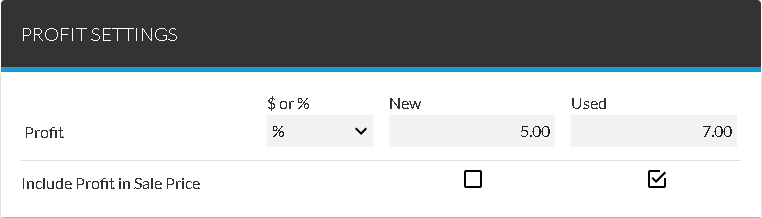
This additional amount can be included in the sale price or itemized as a separate item and displayed on the lead sheet using the fields on this panel.
The following items are available in the Profit Settings panel.
$ or %: Select whether to increase the vehicle sell price by a fixed dollar amount or by a percentage of the vehicle sell price.
New: Enter the dollar amount or percentage to add to proposals for new vehicles.
Used: Enter the dollar amount or percentage to add to proposals for used vehicles.
Include Profit in Sale Price - New: Select this check box to add the entry in the Profit - New field to the sell price of new vehicles. Clear this check box to itemize the profit amount separately on the lead sheet.
Include Profit in Sale Price - Used: Select this check box to add the entry in the Profit - Used field to the sell price of used vehicles. Clear this check box to itemize the profit amount separately on the lead sheet.
Click here for a list of products that may be mentioned in this help file.